
Forum Replies Created
-
AuthorPosts
-
chiefwoodworker
SpectatorHi Matt,
It’s easy. See the attached images. First, check the “Bottom Rail Draw?” checkbox on the Face Frame tab. Subtract the thickness of the Bottom (3/4″) from the Bottom Rail width (1 1/2″) and set the “Bottom Inset” default on the Base Cabinets tab for that amount. Note one the face_frame_tab.jpg attachd that you have to adjust the Drawer Front Heights because you added the Bottom Rail. Be sure to click Update after each change on any tab.
Joe….
Attachments:
You must be logged in to view attached files.SpectatorOooooo! That’s not good. When you are not too busy and have time to try it again I can help you; either vial phone or with an on-line join.me session. Let me know when you are ready.
SpectatorHi Todd,
Good catch! I’ll add those to the bug list and they should be fixed in the next 2.00 Beta release. Are you a Beta tester?
Joe….
SpectatorThis seems to be a personal preference thing vs an industry standard. We chose to implement it with the front height dimensions versus the opening dimensions because most cabinet shops order drawer fronts and boxes from a third party and often order standard sizes. Either way, CabWriter does the arithmetic, the user doesn’t need to, though there are a few tricks that help selection go faster. I should create a video of that.
That said, it may make sense to give the user an option with a default. No promises, but let me look at it.
Joe….
SpectatorHi Rob,
I checked the default for the alignment slot and it comes ‘factory set’ to 5/32″ as Greg said. Thanks for your interest in CabWriter. Let us know if there is anything we can do to help you master it.
Joe….
SpectatorWhoops! My apologies. I just notice that I missed the version of SketchUp you are using. CabWriter will not work on SketchUp 8. You need SketchUp 2015 or later. In fact, when CabWriter 2.0 comes out we will not support version 2015 either (though it will likely work on 2015).
Hi Andy,
In my previous reply, I asked what operating system you were using and what version of SketchUp. Without those two pieces of information, I can only give you a guess as to the problem. The third image you posted say it can’t find the ‘fileutils’ file. This is part of the Ruby interpreter supplied by SketchUp. If you can’t find this file I am guessing that you are using a version of SketchUp that didn’t include it. CabWriter only works on versions 2015 and later. So, are you using a version of SketchUp older that this?
Joe….
-
This reply was modified 8 years, 9 months ago by
-
This reply was modified 8 years, 9 months ago by
SpectatorHi Andy,
What operating system are you using and what version of SketchUp. If it is Windows and SketchUp 2017 or 2018 got to Window > Extension Manager and check if it is there and enabled. If not it is not installed. If it is, then go to View > Toolbars and check CabWriter. If it is not, write me at [email protected].
Joe…..
SpectatorHi Earl,
Just wondering if you still are having a problem or if you figured it out on your own.
Joe….
SpectatorHi Earl,
The error message you are getting is usually a result of a parameter that causes SketchUp to attempt to draw a circle in space (where there is no face). Most often it is because the user made the depth of the cabinets more shallow but failed to change where the back shelf holes are drawn. If you send your .skp file to me at [email protected] I will look at the problem and tell you what you have done wrong.
Joe….
SpectatorHi Rob,
If you send me your .skp file I will create a short video and show you how to fix this and explain how to do it from the start. I’ll then post the video and explanation on the blog for all to learn from. Send the .skp file to [email protected] or you can attach it to a reply of this message. Thanks,
Joe….
SpectatorHi Lynn,
At the moment we do not draw the drawer boxes. Rather we just provide the overall dimensions. Our assumption is that people either purchase their drawer boxes (most professional cabinet shops do), or if they make them in their shop they probably use many different construction techniques. Also, the slide out shelves come in many shapes. We would not be able to cover all of them. So it is likely we will just continue to provide the overall dimensions.
Joe….
SpectatorHi Lynn,
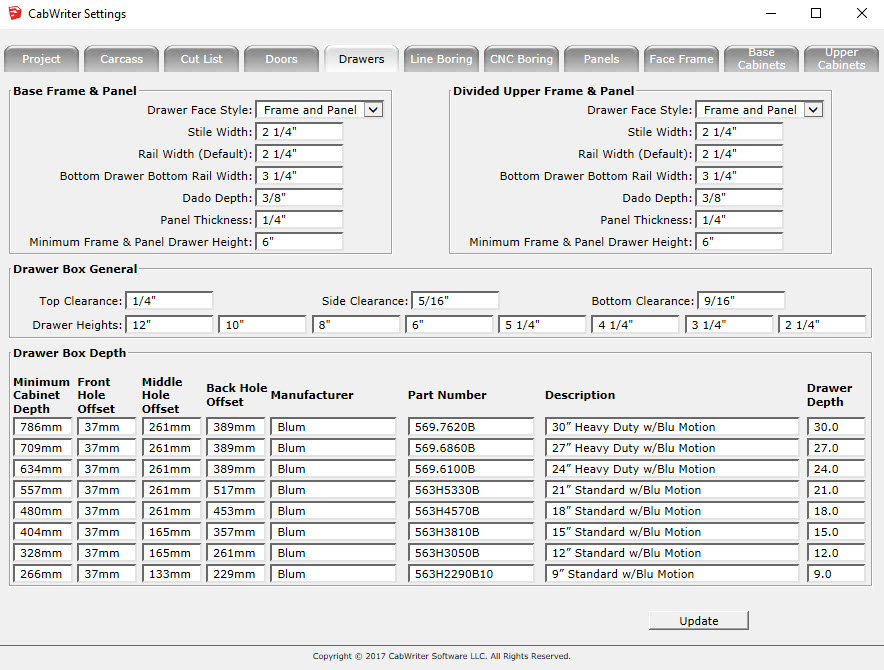
You can specify a drawer slide manufacturer and hole positions on the Drawers tab of the CabWriter Settings dialog. See attached image. See attached image. What we have not supplied is a drop down box that allows you to choose the specific slide. We may in the future, but in our attempt to keep the price of CabWriter low we have tried to avoid the ‘providing all features’ trap. In this case we felt that most cabinetmakers use one or two manufactures and one or two of their slide lines. Perhaps we should look at this decision again.
We will have dadoes and rabbets in revision 2.0. I can’t commit to when it will be available at the moment, but I would guess some time this fall.
We will also provide the ability for the user to provide a cross section(s) of their door frame style and we will use it to draw the door, draw and other fame and panel pieces. Not sure if we will provided arched door/drawer capability in revision 2.0, but it will not be far behind.
Could you provide a SketchUp model of the slide out drawer you are describing. I am not picturing it clearly.
I thinks we will provide integrated toe kicks in the next release. Though my personal opinion is that ladder bases are quicker and more accurate to install, less costly and makes better use of plywood optimization.
I am glad you have found the videos useful. Stay tuned, there are more videos and blogs coming. If you have something specific you would like covered please don’t hesitate to mention it.
Greg, please comment if you have anything to add.
Joe….
-
This reply was modified 9 years, 3 months ago by
SpectatorHi Lynn,
Thank you for studiously following my SketchUp and CabWriter tutorials. If I have done my job it will make you a much better user of the tools.
The grid tool you are looking for is part of my Construction Plus tool set. Construction Plus is found under the SketchUp > Free Plugins menu of the website. To make it easy on you click here.
In Part 1 I give you a link to the finished model. Again, for your convenience, you can click here. When you download this model you can get the construction points and lines (Story Stick) by clearing all layer visibility check boxes except Layer0 and $Construction$. Then follow this procedure:
1 In my finished model click on menu Edit > Select All
2 In my finished model click on menu Edit > Copy
3. In your blank or new model click on menu Edit > Paste In Place
This will give you the same points in the same place.I hope this helps. Again, thanks for your interest.
Joe….
-
This reply was modified 9 years, 3 months ago by
SpectatorHi Tom,
Did Greg’s suggestion fix the problem? If not email me at [email protected] and we can set up a phone conference to fix it.
Joe….
SpectatorHi Tom,
Wow! If you are using the version I distributed in a SketchUp class last spring at NESAW you are way behind. You don’t have to wait until next week. Revision 1.0.0 will be available tomorrow Friday the 31st.
If you think you may need help getting up to speed on it I will be in Northampton tomorrow at the Smith Vocational School demonstrating CabWriter 1.0.0. You could join us and I can help you there. Bring your .skp file and we can make the changes in real time.
Let me know if that works for you via email: [email protected]
Joe…..
-
This reply was modified 8 years, 9 months ago by
-
AuthorPosts
